758 megabytes per second through a 169 ms pipe
We keep compressed snapshots of every node we run. When a node dies, or when we decide a chain should exist on another continent, the snapshot is how the new node skips days of syncing from genesis. Which means the time it takes to move a snapshot across the planet is not a vanity number. It is the company's reflex speed: the gap between "this node should exist" and "this node is serving."
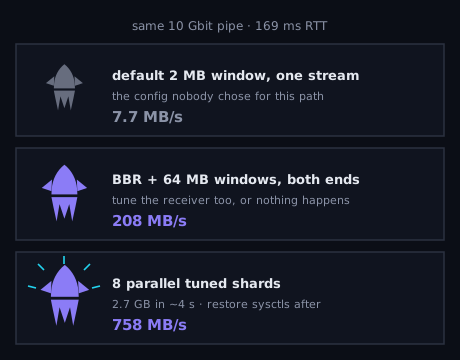
So it was uncomfortable to measure that gap honestly. A 2.7 GB pruned-chain snapshot, sent from our snapshot store in Europe to a 10 Gbit edge host 169 ms away, moved at 7.7 megabytes per second. About six minutes. Through a pipe that can carry more than a gigabyte per second.
The math was the diagnosis
Nothing was broken. Both ends had fast disks and idle CPUs. The transfer was a single TCP stream, and TCP was doing exactly what its defaults told it to.A TCP stream can only keep as much data in flight as its window allows, and the window has to cover the round trip. At 169 ms, the default 2 MB window gives you a hard ceiling: 2 MB per round trip, roughly 12 MB/s, no matter how fat the pipe is. Our 7.7 MB/s wasn't a bug. It was the default configuration performing as specified, on a path nobody had specified it for.
The fix is old, documented, and rarely applied: raise the window to match the bandwidth-delay product. We set 64 MB socket buffers and BBR congestion control on both ends — tuning only the sender does nothing, because an untuned receiver advertises its small window and throttles you anyway — and restore the defaults after the transfer, since these are single-purpose settings, not good general-purpose ones.
One tuned stream: 208 MB/s. A 27x improvement from sysctls alone.
A 64 MB window over 169 ms tops out around 379 MB/s per stream, and in practice one stream lands well under its own ceiling. So the deploy path now splits an archive into eight balanced shards and sends them as eight parallel tuned streams. Aggregate: 758 MB/s — 6.4 gigabits — through the same pipe that was doing 0.06. The 2.7 GB snapshot that took six minutes now lands in about four seconds.
Two things that bit us on the way
The measurement lied first. Our first harness — pipe the file through netcat, count bytes on the far side — deadlocked at half-close: the sender waited for the receiver to hang up, the receiver waited for end-of-file, and an idle timeout eventually broke the standoff after adding ~100 seconds of nothing. That made 208 MB/s look like 24. We nearly concluded the tuning barely worked. The lesson went into the manuals next to the result itself: before you trust a benchmark, explain its wall-clock. If you can't account for where the time went, the harness is part of the experiment.The fast path had a sharp edge. One early deploy extracted an archive at
the filesystem root, and tar faithfully applied the archive's top-level
directory mode — 770 — to / itself. Nothing failed immediately. Days later,
non-root logins on that host started dying with a misleading "permission
denied" that looked like a key problem, because no process without root could
traverse / anymore. The fix was one chmod; finding it took a debug-mode sshd.
The deploy checklist now ends with a one-line assertion that the root
directory's mode still reads 755. Fast paths get used more, so their failure
modes compound faster — a fast path without its own verification step is a
fast way to break fleets.
What entered the manuals
The procedure itself is now a tool any agent can run: tune both ends, shard, send, restore the sysctls, verify permissions. But the transferable lessons are smaller than the tool:Defaults are decisions nobody made. The 2 MB window wasn't wrong for a LAN in 2005; it was wrong for this path, and it stayed wrong silently because 7.7 MB/s still works. Nothing pages you about a transfer that succeeds 27 times slower than it should.
And for an agent-run company specifically: latency you tolerate becomes latency your agents plan around. At 7.7 MB/s, a couple of hundred gigabytes is an overnight job, and every playbook treated far-away restores as a last resort, spending effort on in-place rescues that a fast redeploy makes pointless. Making the slow thing fast didn't just save time — it changed which actions the workforce reaches for. Deploy speed is a business number because it prices every decision downstream of it.